If you've been seeing adorable AI-generated sticker packs all over Pinterest, Instagram and WhatsApp, you're probably wondering how people create them. The good news: you don't need to be a designer or illustrator. With the right AI prompt and a single high-quality photo, you can generate a professional-looking sticker sheet featuring multiple cartoon versions of yourself with different emotions and poses.
Below is the exact prompt I use to generate a full 16-sticker sheet from one reference photo — I ran it on my own photo to make the example sheet further down this page. Copy it, swap in your own photo, and you'll have a complete sticker pack in about a minute.
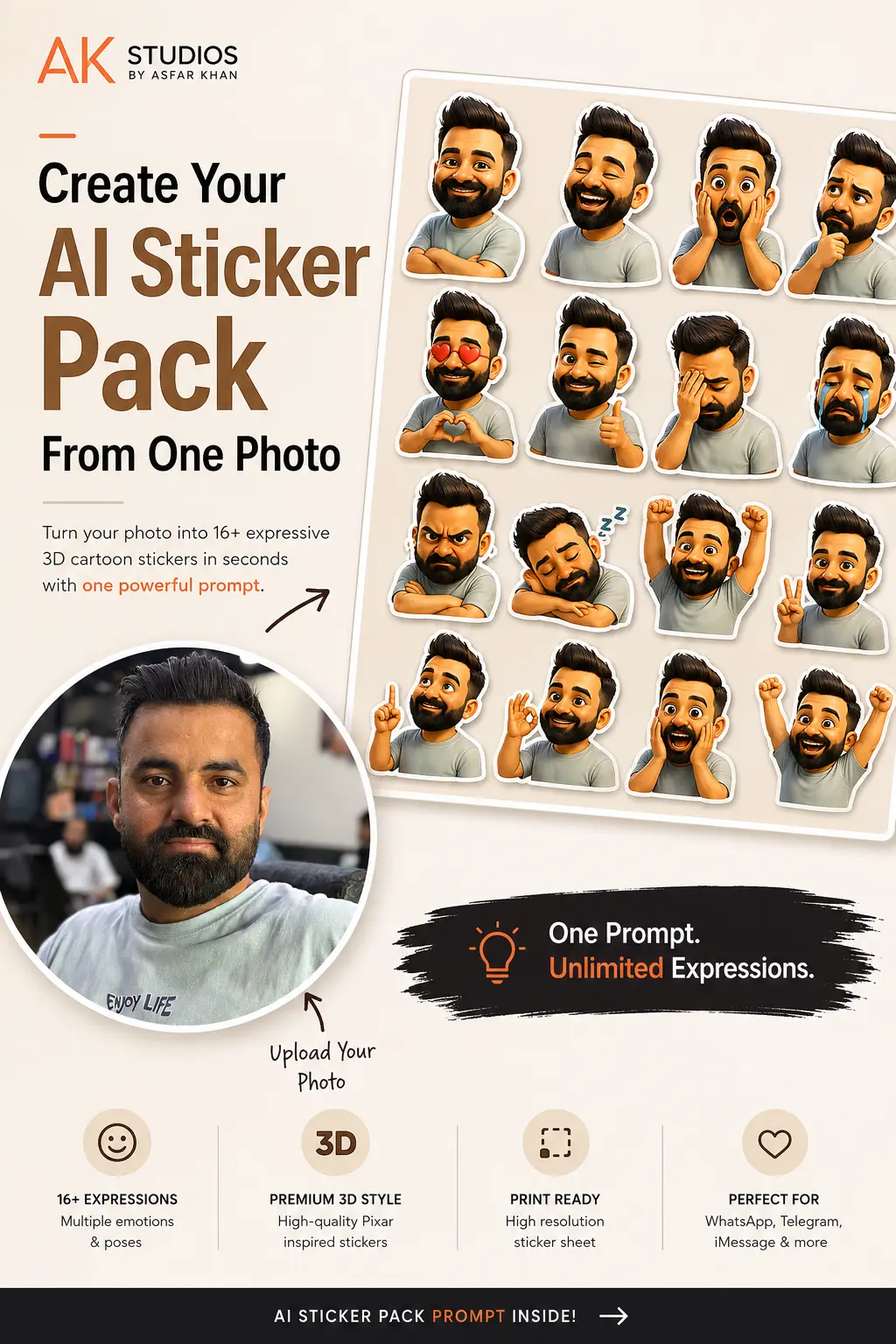
One reference photo in, one full 16-sticker pack out — this is the actual result from the prompt below.
Table of Contents
What Is an AI Sticker Pack?
An AI sticker pack is a collection of expressive cartoon versions of yourself generated from one reference photo. Instead of creating each sticker manually, modern AI image generators can analyze your appearance and produce multiple stickers while keeping your face recognizable.
You can use them for WhatsApp, Telegram, Discord, Instagram Stories, iMessage, YouTube branding, Twitch emotes, general social content, personal branding, or printable sticker sheets — the same sheet works across all of them.
What You'll Need
Before generating your stickers, prepare:
- A clear portrait photo
- Good lighting
- Your face fully visible
- A high-resolution image
- A neutral background (recommended)
- One AI image generator that supports image references
Best Photo Tips
For the best results:
- Face the camera naturally
- Avoid sunglasses or face coverings
- Use soft daylight or good indoor lighting
- Keep your hairstyle visible
- Wear clothing you want the AI to recreate
- Upload the highest-quality photo possible
How to Use This Prompt
- Open your favorite AI image generator.
- Upload one or more clear photos of yourself.
- Copy the prompt below exactly as written.
- Paste it into the prompt box.
- Generate the image.
The AI will analyze your uploaded photo and create a complete sticker sheet with multiple emotions while preserving your appearance.
Free AI Sticker Pack Prompt
Copy everything below exactly as written for the most consistent results.
Create a premium, high-quality 4:5 vertical sticker sheet (1500 x 1875 px) using the uploaded reference photo of the person. Analyze the facial features, hairstyle, skin tone, clothing style, accessories, and overall appearance from the uploaded image, then transform the same person into a cute, expressive 3D chibi/Pixar-inspired cartoon character while maintaining a clear resemblance to the original person.

The final output should be one single printable sticker sheet containing 12-16 individual die-cut stickers, each with a thick white outline and subtle soft shadow, arranged in a clean grid with even spacing. Every sticker must be separate and easy to crop.

Character Requirements

- Preserve the person's identity and recognizable facial features.
- Keep the same hairstyle, hair color, facial hair (if any), glasses, clothing colors, and accessories whenever possible.
- Enlarge the eyes slightly for a cute cartoon look.
- Rounded face proportions.
- Soft cinematic lighting.
- High-detail 3D rendering.
- Premium Pixar/Disney-quality character design.
- Smooth textures.
- Expressive facial animations.
- Consistent outfit across every sticker.

Sticker Expressions & Poses

Create unique stickers showing:

1. Happy smile
2. Laughing
3. Shocked
4. Confused
5. Thinking
6. Love (heart eyes or holding a heart)
7. Winking with thumbs up
8. Facepalm
9. Crying
10. Angry
11. Sleeping
12. Celebrating
13. Peace sign
14. Pointing upward
15. OK gesture
16. Excited with both hands raised

Each expression should have different body language, hand gestures, and facial expressions.

Style

- Premium 3D cartoon
- Pixar-inspired
- Cute collectible sticker aesthetic
- Vibrant but natural colors
- Smooth glossy finish
- Rounded proportions
- Highly expressive eyes
- Soft ambient lighting
- Professional illustration quality

Sticker Design

Each sticker should include:

- Thick white die-cut border
- Soft drop shadow
- Transparent-looking sticker edges
- No overlapping stickers
- Uniform sizing
- Perfect spacing
- High-resolution details

Layout

- Vertical 4:5 canvas
- Clean minimal arrangement
- 12-16 stickers
- Equal margins
- Balanced composition
- Beige, cream, or light neutral background (or transparent if supported)

Quality

- Ultra HD
- 8K detail
- Sharp edges
- Crisp facial features
- Consistent proportions
- Professional printable sticker sheet
- No blurry faces
- No duplicated expressions
- No cropped stickers

Negative Prompt

Do not:

- Change the person's identity
- Change gender
- Add extra fingers
- Add extra limbs
- Distort facial proportions
- Change hairstyle dramatically
- Make stickers overlap
- Add unnecessary objects
- Add text
- Add logos
- Add watermark
- Add background clutter
- Use low resolution
- Create duplicate poses or expressions
- Crop any sticker
- Produce inconsistent clothing or colors

Goal: Generate a premium-quality, printable sticker pack that faithfully transforms the uploaded photo into a fun, expressive set of 3D cartoon stickers while preserving the person's identity and overall appearance.
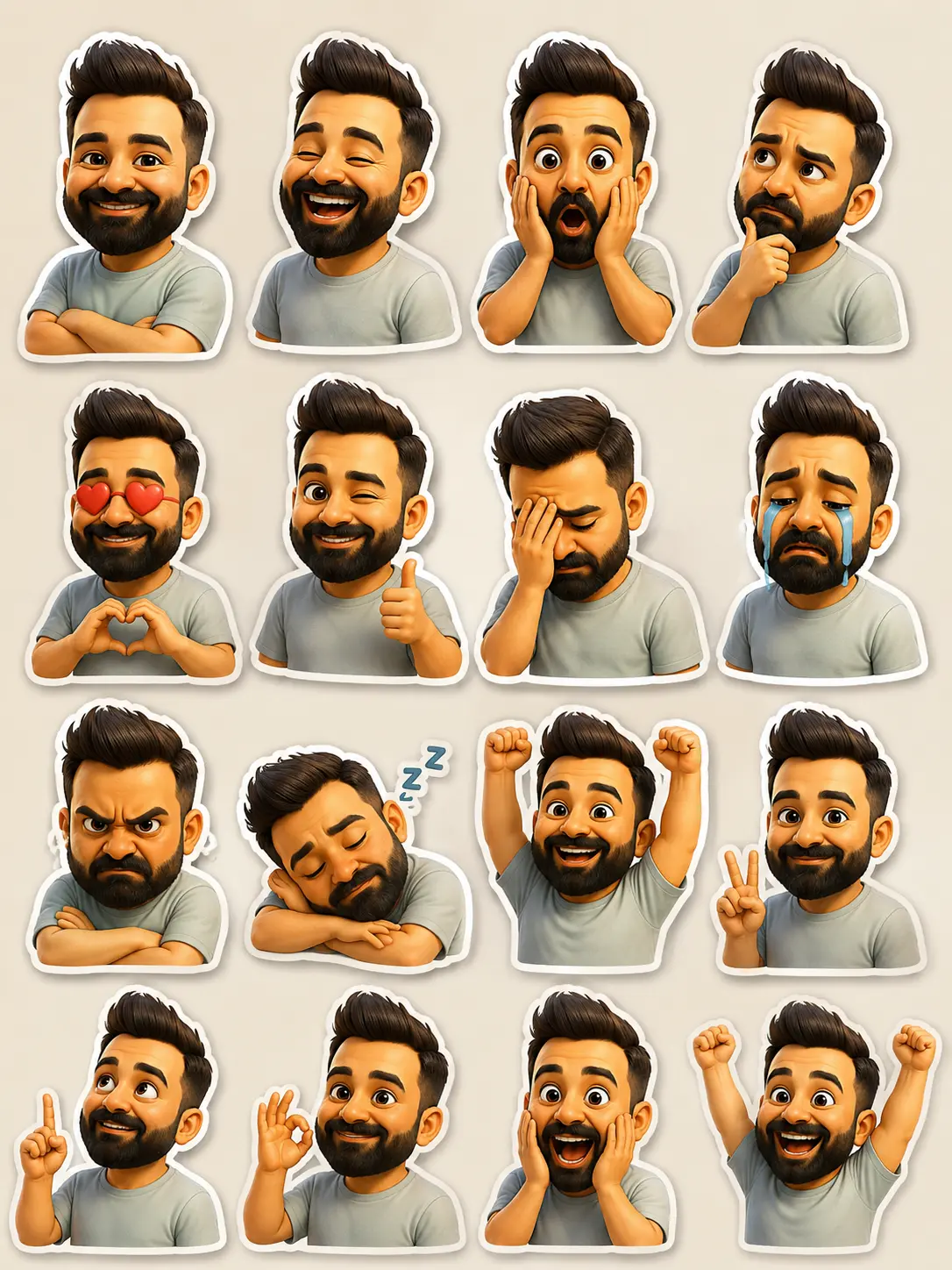
The finished 16-sticker sheet, generated from the reference photo above using the prompt as-is.
Pro Tips for Better Results
If your AI generator supports multiple reference images, upload two to four photos showing different angles:
Front-Facing Portrait
Your main reference — clear, well-lit, face fully visible.
Side Profile
Helps the AI understand your face shape from another angle.
Smiling Photo
Gives the AI a natural reference for your smile characteristics.
Neutral Expression
A resting-face shot balances out the smiling reference.
This combination helps the AI preserve your facial features more accurately across all 16 stickers, instead of relying on a single angle for every pose.
Where You Can Use Your Sticker Pack
Once generated, you can use your stickers almost anywhere:
- Telegram
- Facebook Messenger
- Discord
- Slack
- iMessage
- Twitch
- YouTube branding
- Printable sticker sheets
- Digital planners & Notion
- Personal branding
Want More AI Content Tricks Like This?
At AK Studios by Asfar Khan, we build AI-assisted content, prompts and creative workflows into our photography, video and social media work for clients across Islamabad, Rawalpindi and Pakistan. If you'd rather have us handle your brand's content strategy, we're happy to talk.
Talk to UsFrequently Asked Questions
Can I use any photo for this prompt?
Yes, but a clear, high-resolution portrait produces the best results. A well-lit, front-facing photo with your face fully visible gives the AI the most to work with, so the resemblance holds up across all 16 stickers.
Which AI image generator works best for this prompt?
Any modern AI image generator that supports uploaded image references can work well with this prompt, including ChatGPT's image generation, Google Gemini and similar tools.
Can I change the expressions in the prompt?
Absolutely. Simply edit the "Sticker Expressions & Poses" section to include the emotions or gestures you want instead of the 16 listed, and keep the rest of the prompt as written.
Can I create stickers for friends or family?
Yes. Upload their photo instead of yours and use the same prompt exactly as written — it works for any face, not just your own.
How many stickers does this prompt generate?
12 to 16 individual die-cut stickers on a single printable sheet, each showing a different expression, pose or hand gesture while keeping your identity, hairstyle and outfit consistent.
Can I upload more than one reference photo?
Yes, if your AI generator supports multiple reference images. Uploading two to four photos — a front-facing portrait, a side profile, a smiling shot and a neutral expression — helps the AI preserve your facial features more accurately.
Is this AI sticker pack prompt free to use?
Yes, the full prompt in this guide is free to copy and use. You only need access to an AI image generator that supports image uploads.
Where can I use my finished sticker pack?
Almost anywhere — WhatsApp, Telegram, Instagram, Facebook Messenger, Discord, Slack, iMessage, Twitch, YouTube branding, printable sticker sheets, digital planners, Notion and personal branding all work with the same sheet.
What if a sticker doesn't look quite right?
Regenerate the image. AI image generation is inconsistent from attempt to attempt, and a second or third try often fixes a distorted pose or an off facial proportion without you needing to change the prompt itself.
Final Thoughts
Creating your own AI sticker pack has never been easier. With a single photo and the prompt above, you can generate a fun collection of expressive cartoon stickers that look consistent, high-quality, and ready to share.
Whether you're creating stickers for messaging apps, social media, content creation, or personal branding, this prompt provides a solid starting point for professional-looking results — the exact process I used to make the sheet on this page.