Ever wanted your own custom WhatsApp stickers that actually look like you? With the latest AI image generators, you can transform a single selfie into a premium Pixar-style 3D chibi sticker pack complete with different emotions, poses, colorful captions and a glossy die-cut finish — no illustrator, no design software, no waiting.
Below is the exact prompt I use to generate professional-quality sticker sheets that work perfectly for WhatsApp, Telegram, iMessage, Discord and social media. I ran it on my own photo to make the example sheet further down this page — copy it, swap in your own reference photo, and you'll have a full 15-sticker pack in about a minute.
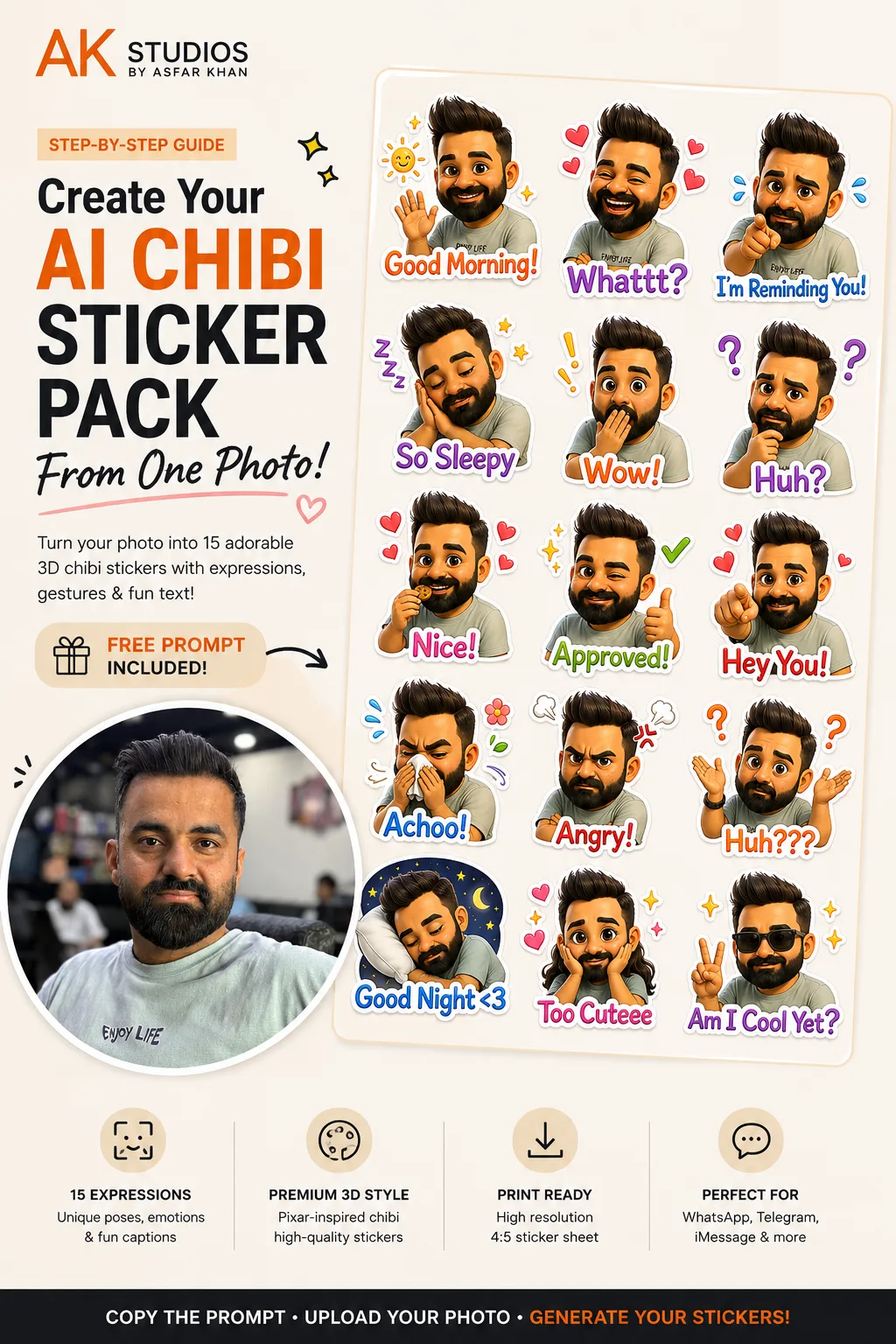
One reference selfie in, one full 15-sticker chibi pack out — this is the actual result from the prompt below.
Table of Contents
What You'll Need
Creating your own AI sticker pack is incredibly simple. You only need:
- A clear, front-facing photo of yourself
- ChatGPT (GPT-4o Image), Google Gemini, or another AI image generator that accepts an uploaded reference photo
- The prompt below
- About one minute
Best Photo Tips
For the highest quality stickers, upload a photo that has:
- Good lighting
- Your full face visible
- Minimal blur
- A neutral background (preferred)
- No sunglasses
- Your hairstyle clearly visible
- Beard, glasses or accessories visible, if you want them included
The better your reference photo, the better your stickers will resemble you. A clean, well-lit headshot beats a cropped group photo or a dim, blurry selfie every time.
How to Use This Prompt
- Upload your photo to ChatGPT, Gemini or another AI image generator.
- Copy the prompt below exactly as it is.
- Paste it into your AI image generator.
- Generate the image.
- Download your sticker sheet.
The AI will analyze your appearance and automatically create an expressive sticker pack based on your face — you don't need to describe your own features, the prompt does that analysis for you from the uploaded photo.
Copy the Free AI Chibi Sticker Prompt
This is the full prompt, unedited. Copy it exactly as written for the most consistent results.
Create a premium-quality 4:5 vertical sticker sheet (1500 x 1875 px) using the uploaded reference photo of the person. Carefully analyze the face, hairstyle, skin tone, eye shape, eyebrows, smile, clothing, accessories, and overall appearance, then transform the same person into an adorable 3D Chibi / Pixar-inspired cartoon character while preserving a strong resemblance to the original person.

The final output should be one single 4:5 sticker sheet containing 15 individual die-cut chat stickers arranged in a clean 3 columns x 5 rows grid with equal spacing.

Each sticker should include:

- A unique facial expression
- Dynamic hand gestures
- Cute body language
- Decorative icons (hearts, stars, question marks, sparkles, sleepy Z's, etc.)
- Large colorful text integrated into the sticker
- Thick white die-cut outline
- Soft drop shadow
- Premium glossy sticker finish

The sticker sheet should look like an official WhatsApp, Telegram, iMessage or LINE premium sticker pack.

Character Requirements

Use the uploaded photo as the only facial reference.

Preserve:

- Facial identity
- Hairstyle
- Hair color
- Beard or mustache (if present)
- Skin tone
- Glasses (if any)
- Clothing colors
- Accessories
- Face proportions
- Smile characteristics

Enhance the character with:

- Large expressive eyes
- Cute rounded cheeks
- Soft facial shading
- Slightly oversized head
- Small body proportions
- Premium Pixar-quality rendering
- Smooth glossy textures
- Soft cinematic lighting
- Consistent appearance across every sticker

Sticker Layout

Canvas Size: 1500 x 1875 px
Aspect Ratio: 4:5

Arrange:
- 3 columns
- 5 rows
- Equal margins
- Equal spacing
- No overlapping stickers
- Perfect alignment

Background: Plain white, cream, or transparent-looking background.

Sticker Style

- Premium 3D
- Pixar-inspired
- Disney-quality
- Cute Chibi
- High-end emoji style
- Collectible sticker aesthetic
- WhatsApp sticker quality
- Vibrant colors
- Soft gradients
- Glossy finish
- Professional illustration
- Clean outlines
- Soft shadows

Expressions & Text

Sticker 1
Expression: Big happy smile while waving.
Text: Good Morning!
Text Color: Orange & White
Decorations: Sun, sparkles.

Sticker 2
Expression: Laughing with closed eyes.
Text: Whattt?
Text Color: Purple
Decorations: Pink hearts.

Sticker 3
Expression: Cute worried face pointing toward viewer.
Text: I'm Reminding You!
Text Color: Blue
Decorations: Water drops.

Sticker 4
Expression: Sleeping peacefully.
Text: So Sleepy
Text Color: Purple
Decorations: Zzz icons.

Sticker 5
Expression: Surprised with hand over mouth.
Text: Wow!
Text Color: Orange
Decorations: Yellow exclamation marks.

Sticker 6
Expression: Thinking pose.
Text: Huh?
Text Color: Purple
Decorations: Question marks.

Sticker 7
Expression: Eating happily.
Text: Nice!
Text Color: Pink
Decorations: Small hearts.

Sticker 8
Expression: Winking with thumbs up.
Text: Approved!
Text Color: Green
Decorations: Green checkmark.

Sticker 9
Expression: Pointing toward viewer.
Text: Hey You!
Text Color: Red
Decorations: Hearts.

Sticker 10
Expression: Sneezing.
Text: Achoo!
Text Color: Blue
Decorations: Tiny flowers and tissue.

Sticker 11
Expression: Very angry.
Text: Angry!
Text Color: Red
Decorations: Steam clouds and anger symbol.

Sticker 12
Expression: Confused with both hands raised.
Text: Huh???
Text Color: Orange
Decorations: Question marks.

Sticker 13
Expression: Sleeping on pillow.
Text: Good Night <3
Text Color: Blue
Decorations: Moon, stars.

Sticker 14
Expression: Hands on cheeks looking adorable.
Text: Too Cuteee
Text Color: Pink
Decorations: Hearts and sparkles.

Sticker 15
Expression: Wearing sunglasses making a peace sign.
Text: Am I Cool Yet?
Text Color: Purple
Decorations: Stars and sparkles.

Sticker Design

Each sticker should have:
- Thick white die-cut border
- Glossy finish
- Soft shadow
- Bright colorful text
- Rounded edges
- High readability
- Cute decorative icons
- Clean cut lines
- Premium print quality

Quality

- Ultra HD
- 8K quality
- Crisp details
- Sharp facial features
- Consistent hairstyle
- Perfect hands
- Perfect fingers
- Smooth skin
- No blurry areas
- Professional illustration
- Print-ready
- Social-media-ready

Negative Prompt

Do NOT:
- Change identity
- Change hairstyle
- Change beard style
- Change clothing color
- Add extra fingers
- Add extra arms
- Add extra legs
- Distort face
- Create duplicate expressions
- Repeat poses
- Misspell text
- Crop stickers
- Overlap stickers
- Use low resolution
- Add watermark
- Add logos
- Add background clutter
- Blur facial features
- Produce inconsistent character proportions

Goal

Generate a premium WhatsApp-style Chibi sticker pack that perfectly matches the uploaded person while maintaining identity across all stickers. The result should look like a professionally illustrated commercial sticker pack with colorful captions, expressive emotions, glossy die-cut borders, and a clean 4:5 printable layout suitable for WhatsApp, Telegram, LINE, iMessage, Discord, and social media.
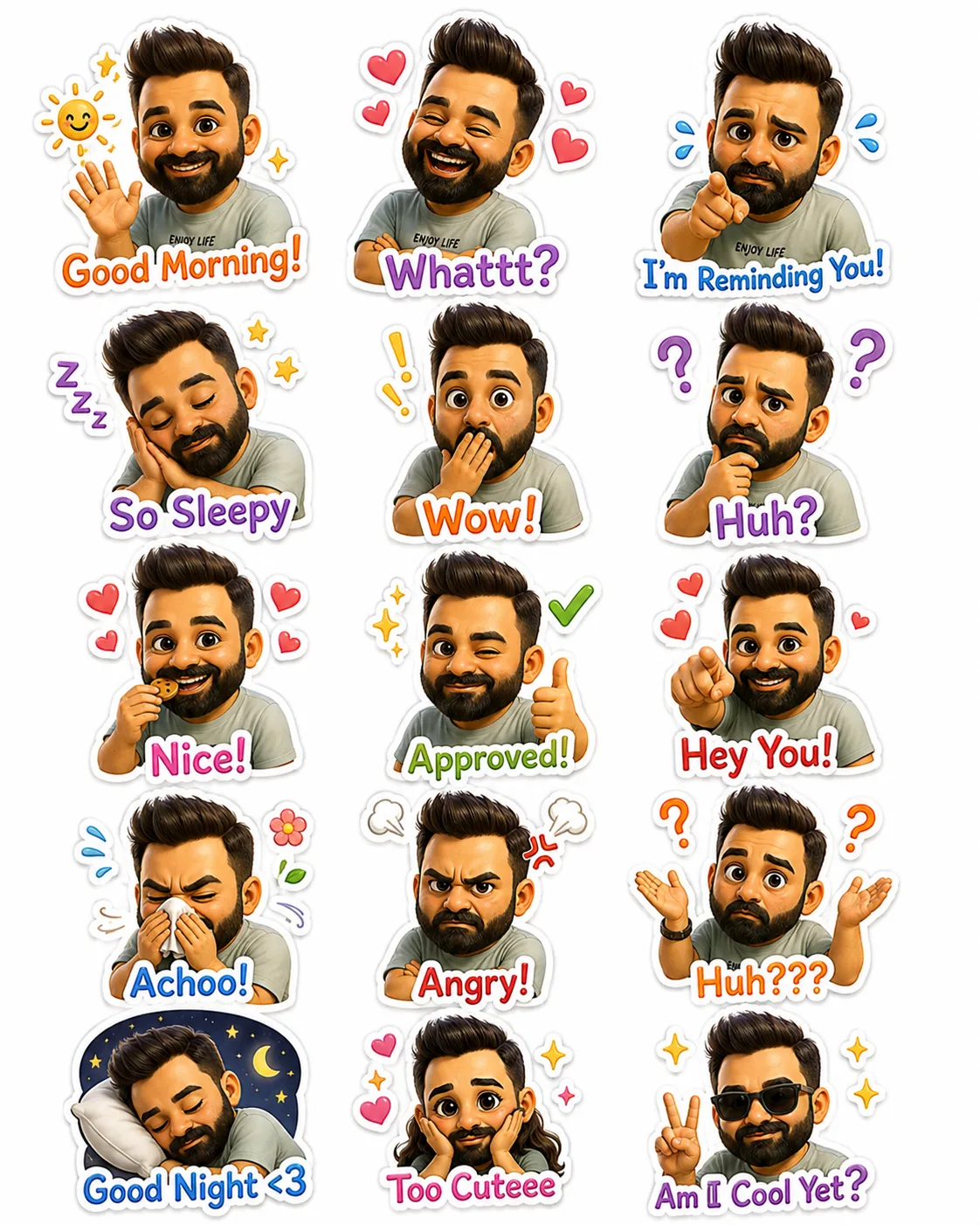
The finished 15-sticker sheet, cropped from the reference photo above using the prompt as-is.
Why This Prompt Works So Well
Most people who try to generate a sticker pack from scratch get inconsistent results — a different face shape on every sticker, mismatched hair color, or text that drifts off the canvas. This prompt avoids all of that by front-loading the constraints instead of leaving them to chance.
Locked Identity
Explicit instructions to preserve facial identity, hairstyle, beard and skin tone stop the AI from "drifting" into a generic cartoon face by sticker 10.
Fixed Layout
Specifying the exact canvas size, grid and spacing keeps all 15 stickers aligned instead of overlapping or unevenly sized.
Per-Sticker Detail
Writing out the expression, text, color and decoration for each of the 15 stickers individually removes guesswork the AI would otherwise fill in inconsistently.
A Real Negative Prompt
Explicitly listing what not to do — extra fingers, duplicate poses, misspelled text — catches the most common AI image generation failures before they happen.
Where to Use Your Sticker Pack
Once you've got your 15-sticker sheet, crop out each individual sticker (most photo editors or even your phone's crop tool work fine) and load them into a sticker-pack app:
- WhatsApp: Use the "Create Your Own Stickers" option inside WhatsApp's sticker tray, or a dedicated app like Sticker.ly, to package your cropped images into an installable pack.
- Telegram: Telegram's own @Stickers bot lets you upload individual PNGs and publish a shareable sticker pack in a few messages.
- iMessage: Add stickers through the Stickers app on iOS, or use a sticker-pack app from the App Store that supports custom uploads.
- Discord: Server admins can upload custom stickers directly in Server Settings for members to use in chat.
- Instagram & social media: Use the individual sticker images directly in Stories, or as reaction images in group chats.
Pro Tips for Better Results
- Use a high-resolution portrait for the best facial resemblance.
- Keep your face unobstructed by hats or sunglasses in the reference photo.
- If the text is misspelled or a sticker looks off, regenerate the image — AI often improves on the second attempt.
- Want more variety? Replace the captions with your own favorite phrases or add extra expressions like "On My Way," "LOL," "Thank You" or "See You Soon."
Common Mistakes to Avoid
- Editing the prompt structure instead of just the captions. Swap out expressions and text freely, but keep the canvas size, grid layout and preservation instructions intact — that's what keeps the result consistent.
- Uploading a low-quality or heavily filtered photo. Beauty filters and heavy edits confuse the AI's read on your actual features, which shows up as a less accurate resemblance across all 15 stickers.
- Accepting the first result if the identity drifted. If later stickers stop looking like you, regenerate rather than settling — this is the single most common fixable issue.
- Skipping the crop step before uploading to a sticker app. WhatsApp, Telegram and iMessage all expect individual sticker images, not the full sheet — crop first.
Final Thoughts
AI has made it easier than ever to create personalized sticker packs without any design experience. With one photo and the prompt above, you can generate a polished collection of expressive chibi stickers that look great in chats, on social media, or even as printable stickers.
Whether you're creating them for yourself, your friends, or your business, this prompt is a fun and easy way to turn a simple portrait into a unique sticker pack — the exact process I used to make the sheet on this page.
Want More AI Content Tricks Like This?
At AK Studios by Asfar Khan, we build AI-assisted content, prompts and creative workflows into our photography, video and social media work for clients across Islamabad, Rawalpindi and Pakistan. If you'd rather have us handle your brand's content strategy, we're happy to talk.
Talk to UsFrequently Asked Questions
What AI tools can I use to make an AI chibi sticker pack?
Any AI image generator that accepts an uploaded reference photo works, including ChatGPT with GPT-4o image generation, Google Gemini, and similar tools. Upload your photo, paste the prompt, and generate the sticker sheet in one pass.
Is this chibi sticker pack prompt free?
Yes, the full prompt in this guide is completely free to copy and use. You only need access to an AI image generator that supports image uploads, and most platforms offer some free image generations before requiring a paid plan.
How long does it take to make a sticker pack this way?
About a minute once you have your reference photo ready. Upload the photo, paste the prompt, and let the AI generate the full 15-sticker sheet in a single pass.
What's the best photo to use for accurate results?
A clear, front-facing selfie with good lighting, a neutral background, no sunglasses, and your hairstyle fully visible. The closer your reference photo is to a clean headshot, the more the stickers will actually look like you.
Can I use these stickers on WhatsApp?
Yes. Generate the sticker sheet, crop out each individual sticker, and add them to WhatsApp using a sticker-maker app like Sticker.ly or WhatsApp's own "Create Your Own Stickers" feature, which packages individual images into an installable sticker pack.
What if the AI misspells the text on a sticker?
Regenerate the image. Text rendering in AI image generators has improved a lot but still isn't perfect, and a second or third attempt often fixes spelling issues without changing anything else about the prompt.
Can I change the captions and expressions in the prompt?
Yes. Replace any of the 15 caption and expression lines with your own — phrases like "On My Way," "LOL," "Thank You" or "See You Soon" work well and keep the same premium sticker sheet format.
Will it keep my beard, glasses or hairstyle accurate?
Yes, as long as they're clearly visible in your reference photo. The prompt explicitly instructs the AI to preserve facial identity, hairstyle, beard, glasses and clothing colors from the uploaded photo.
Can I use this sticker pack on Telegram, iMessage or Discord too?
Yes. The prompt is written to produce a generic die-cut sticker sheet format that works across WhatsApp, Telegram, iMessage, Discord and social media — you just need each platform's own sticker-pack upload tool to install it.
Is it safe to upload my photo to an AI image generator?
Only upload your photo to reputable, mainstream AI tools and review their data and image-retention policies before uploading anything you wouldn't want stored or reused — the same caution worth applying to any photo you share online.