Imagine sending WhatsApp or iMessage stickers that actually look like you — laughing, rolling your eyes, crying but fine, or saying "Bruh." Thanks to modern AI image generators, creating your own personalized meme sticker pack is easier than ever.
Below is the exact prompt I use to turn a single photo into a premium Pixar-inspired chibi sticker sheet that looks like it came from a professional sticker artist. Copy it, swap in your own photo, and you'll have a full 9-sticker meme pack in a few minutes.
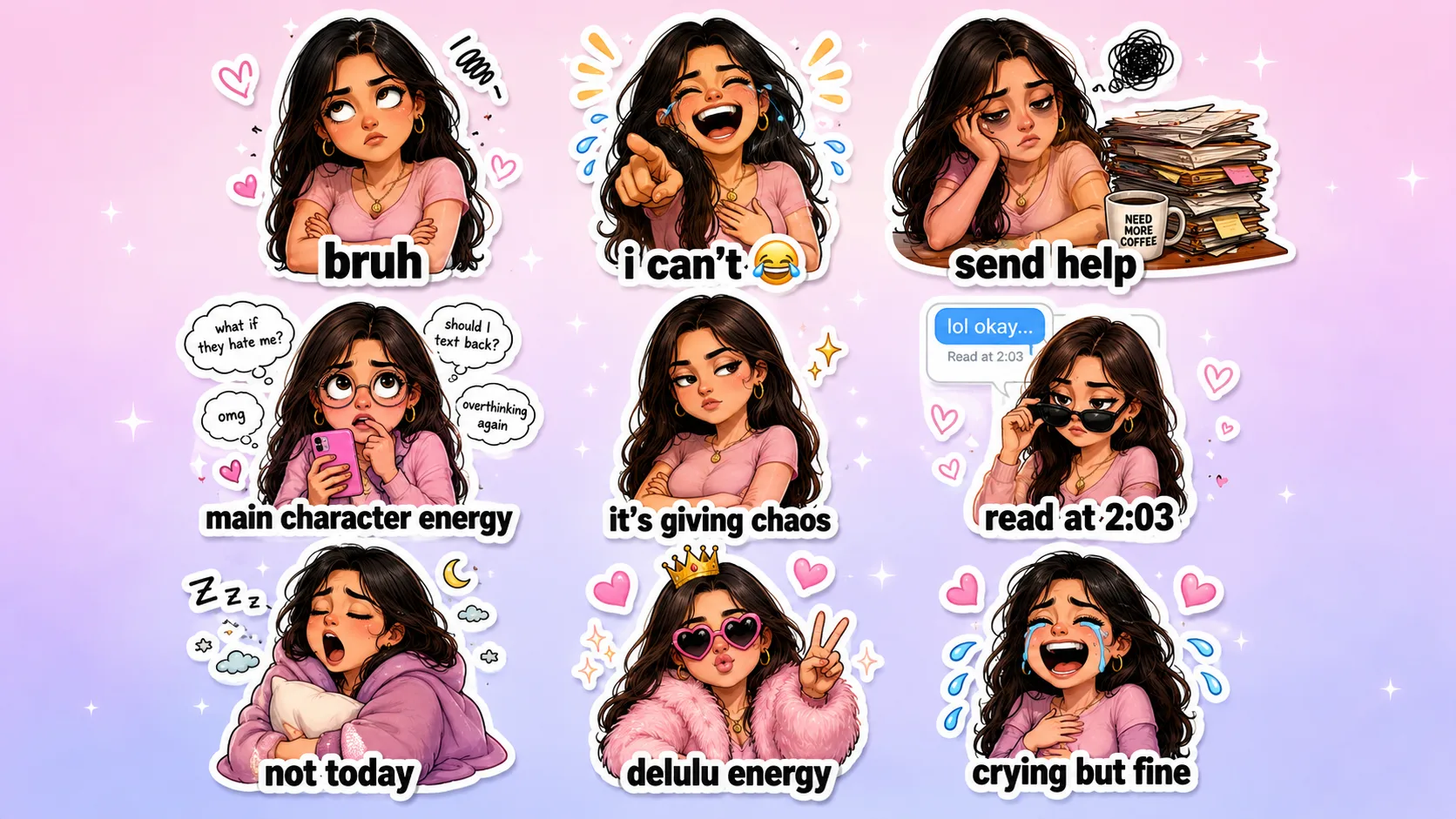
A finished 9-sticker meme pack generated from one reference photo using the prompt below.
Table of Contents
What You'll Create
Using the prompt below, AI can generate a personalized chibi version of yourself with 9 funny internet meme reactions, in an official sticker pack aesthetic ready for WhatsApp, Telegram, iMessage, Discord, Instagram Stories, and print. The final output is a 1920 × 1080 (16:9) horizontal sticker sheet featuring nine professionally illustrated die-cut stickers.
Example Sticker Reactions
Your AI-generated sticker pack includes reactions like:
- Bruh
- I Can't 😂
- Send Help
- Main Character Energy
- It's Giving Chaos
- Read at 2:03
- Not Today
- Delulu Energy
- Crying But Fine
Each sticker features a different pose, facial expression, accessories, and humorous meme caption while preserving your facial identity.
What You Need
Before using the prompt, prepare:
- One clear selfie
- Good lighting
- A front-facing image
- High resolution
- A visible face
- No heavy filters
- Hair clearly visible
The better your reference photo, the more accurate the final stickers will be.
How to Use This Prompt
- Upload a clear photo of yourself.
- Open your favorite AI image generator — ChatGPT Images, Google Gemini, Ideogram, Midjourney with image reference support, Flux-based generators, Reve Image, or any AI model that supports image prompting.
- Paste the complete prompt below exactly as written.
- Generate the image.
The AI will analyze your uploaded photo and create a complete personalized meme sticker pack while preserving your appearance.
Copy & Paste Prompt
Copy everything below exactly as written. Do not modify the prompt unless you want different stickers.
Premium AI Prompt: Create a Personalized Funny Meme Chibi Sticker Pack from My Photo

Instructions for AI

Use the uploaded photo as the only facial reference for the character. Carefully analyze the person's facial features, hairstyle, beard or mustache (if present), eyebrows, eye shape, skin tone, smile, face shape, clothing style, accessories, and overall personality. Transform the same person into a premium 3D Pixar/Disney-inspired Chibi character while maintaining a strong resemblance across every sticker.

The final output should be one single horizontal 16:9 sticker sheet (1920 x 1080 px) containing 9 premium die-cut meme stickers arranged in a clean 3 x 3 grid with equal spacing and perfect alignment.

The overall design should resemble an official iMessage, WhatsApp, Telegram, LINE, Discord, Instagram, or Messenger sticker pack, featuring funny internet expressions, relatable reactions, and meme-style captions.

Character Requirements

Preserve exactly:

- Facial identity
- Hairstyle
- Hair color
- Beard or mustache (if present)
- Skin tone
- Face shape
- Eye shape
- Eyebrows
- Nose
- Smile characteristics
- Clothing colors
- Accessories (watch, glasses, earrings, etc.)
- Overall personality

Enhance with:

- Premium Pixar-quality 3D rendering
- Disney-quality Chibi proportions
- Large expressive eyes
- Rounded cheeks
- Soft cinematic lighting
- Glossy textures
- Cute miniature body
- Highly expressive emotions
- Consistent appearance across every sticker

Canvas

Canvas Size: 1920 x 1080 px
Aspect Ratio: 16:9

Layout

Arrange the stickers in:

- 3 Columns
- 3 Rows
- Equal spacing
- Equal margins
- Perfect alignment
- No overlapping
- Commercial-quality composition
- Plenty of white space

Background

Use a premium pastel background featuring:

- Soft pink and lavender gradient
- Tiny hearts
- Sparkles
- Stars
- Cute doodles
- Minimal decorative elements

The background should remain subtle so the stickers stand out.

Sticker Style

Create premium:

- Pixar-inspired
- Disney-quality
- 3D Chibi
- Cute cartoon
- Meme sticker aesthetic
- Glossy finish
- Thick white die-cut outline
- Soft drop shadow
- Rounded edges
- Vibrant colors
- Commercial sticker quality
- Social-media-ready

Create These 9 Meme Stickers

Sticker 1 - Bruh
Pose: Crossed arms. Rolling eyes upward. Slightly annoyed expression.
Caption: bruh
Decorations: Tiny scribbles and hearts.

Sticker 2 - I Can't
Pose: Laughing uncontrollably. Pointing toward the viewer. Eyes closed. Huge open-mouth laugh.
Caption: i can't
Decorations: Laugh tears, sparkles, comic lines.

Sticker 3 - Send Help
Pose: Exhausted. Resting head on one hand. Messy desk full of papers. Coffee mug. Dark eye circles.
Caption: send help
Decorations: Stress cloud, messy notes, coffee stains.

Sticker 4 - Main Character Energy
Pose: Holding smartphone. Overthinking dramatically. Wide curious eyes.
Caption: main character energy
Around the head include floating thoughts: What if they hate me? / Should I text back? / OMG / Overthinking again
Decorations: Tiny doodles, stars, speech bubbles.

Sticker 5 - It's Giving Chaos
Pose: Crossed arms. Sassy expression. Raised eyebrow. Looking sideways.
Caption: it's giving chaos
Decorations: Sparkles, stars, tiny lightning icons.

Sticker 6 - Read at 2:03
Scene: Holding sunglasses. Looking unimpressed. A floating text message above: "lol okay..." Read at 2:03
Caption: read at 2:03
Decorations: Message bubbles, tiny hearts, notification icons.

Sticker 7 - Not Today
Pose: Wrapped in blanket. Holding pillow. Yawning. Half asleep.
Caption: not today
Decorations: Zzz, moon, clouds, stars.

Sticker 8 - Delulu Energy
Pose: Wearing oversized heart-shaped sunglasses. Peace sign. Luxury faux-fur jacket. Confident smile.
Caption: delulu energy
Decorations: Tiny crown, hearts, sparkles, stars.

Sticker 9 - Crying But Fine
Pose: Laughing while crying. Big smile. Streaming cartoon tears. Hands on stomach.
Caption: crying but fine
Decorations: Blue tear drops, hearts, comic motion lines.

Decorative Elements

Throughout the sticker sheet include:

- Hearts
- Sparkles
- Stars
- Comic doodles
- Chat bubbles
- Emoji icons
- Notification icons
- Tiny clouds
- Motion lines
- Pink accents
- Purple accents
- Cute scribbles
- Pastel shapes

Text Style

Each sticker should have:

- Bold rounded typography
- White outline around text
- Black lettering
- Meme-style caption placement
- Highly readable
- Perfect spelling

Sticker Design

Every sticker must include:

- Thick white die-cut border
- Glossy laminated appearance
- Soft realistic drop shadow
- Smooth gradients
- Rounded edges
- Premium illustration quality
- Consistent proportions
- Cute exaggerated expressions

Quality

Generate in:

- Ultra HD
- 8K quality
- Pixar-level rendering
- Crisp details
- Perfect facial resemblance
- Perfect hands
- Perfect fingers
- Smooth skin
- Sharp edges
- Print-ready
- Social-media-ready
- Premium sticker-shop quality

Negative Prompt

Do NOT:

- Change facial identity
- Change hairstyle
- Change beard or mustache
- Change skin tone
- Distort facial proportions
- Add extra fingers
- Add extra hands
- Add extra limbs
- Blur the face
- Repeat poses
- Repeat expressions
- Crop stickers
- Overlap stickers
- Misspell captions
- Add logos
- Add watermarks
- Use low resolution
- Produce inconsistent character designs
- Add cluttered backgrounds

Goal

Generate a premium commercial-quality 9-piece Funny Meme Chibi Sticker Pack from the uploaded photo. Preserve the person's identity while transforming them into a highly expressive Pixar-inspired Chibi character with hilarious internet-style reactions. Each sticker should feature a unique meme caption, expressive pose, glossy die-cut border, vibrant colors, and polished illustration quality. The final result should resemble an official iMessage, WhatsApp, Telegram, Discord, LINE, or Instagram sticker pack, presented on a clean 1920 x 1080 (16:9) horizontal sticker sheet suitable for printing, digital sharing, and social media.
Tips for Best Results
To achieve the highest-quality stickers:
- Use a high-resolution selfie.
- Keep your face fully visible.
- Avoid sunglasses or face coverings.
- Use natural lighting whenever possible.
- Upload only one person in the photo.
- If your AI generator supports image references, upload your photo before pasting the prompt.
- Generate multiple versions and choose your favorite.
Where You Can Use Your Sticker Pack
Your custom stickers are perfect for:
Chat Apps
WhatsApp, Telegram, iMessage, Discord, Facebook Messenger and Slack.
Social Media
Instagram Stories, Instagram DMs, and general social sharing.
Print & Craft
Printable sticker sheets, Cricut and Silhouette cutting projects.
Content & Branding
Digital planners, personal branding, content creators, streamers and YouTube communities.
Want More AI Content Tricks Like This?
At AK Studios by Asfar Khan, we build AI-assisted content, prompts and creative workflows into our photography, video and social media work for clients across Islamabad, Rawalpindi and Pakistan. If you'd rather have us handle your brand's content strategy, we're happy to talk.
Talk to UsFrequently Asked Questions
Which AI tools work for this meme sticker prompt?
Any AI image generator that supports image prompting works, including ChatGPT Images, Google Gemini, Ideogram, Midjourney with image reference support, Flux-based generators and Reve Image.
How many stickers does this prompt generate?
9 individual die-cut meme stickers arranged in a 3x3 grid on a single 16:9 sticker sheet, each with a different pose, expression and meme caption while keeping your identity consistent.
Can I customize the meme captions?
Yes. Swap any of the 9 sticker scenes and captions — "Bruh," "Delulu Energy," "Send Help" and so on — for your own favorite phrases or reactions, while keeping the rest of the prompt structure intact.
What kind of photo works best for this prompt?
A clear, high-resolution, front-facing selfie with good lighting and your full face visible, no heavy filters and no sunglasses. The closer it is to a clean headshot, the more the stickers will actually look like you.
Is this AI meme sticker prompt free to use?
Yes, the full prompt in this guide is free to copy and use. You only need access to an AI image generator that accepts an uploaded reference photo.
Where can I use my finished meme sticker pack?
WhatsApp, Telegram, iMessage, Discord, Instagram Stories and DMs, Facebook Messenger, Slack, digital planners, printable sticker sheets, and Cricut or Silhouette cutting projects all work with the same sheet.
What if a sticker doesn't look right?
Regenerate the image once or twice. AI image generation is inconsistent between attempts, and a second try often fixes a distorted pose or an off expression without needing to edit the prompt.
Can I make this meme sticker pack for someone else?
Yes. Upload a clear photo of that person instead of your own and use the exact same prompt — it works for any single face, not just yours.
Final Thoughts
Personalized AI sticker packs are one of the most fun ways to express yourself online. With a single selfie and a well-crafted prompt, you can create a professional-quality collection of meme stickers that capture your personality, humor, and style.
Whether you're making stickers for yourself, friends, or your audience, this prompt delivers polished, consistent, and shareable results in just a few minutes — the exact process I used to make the sheet on this page.